
Starburst AI Agent #
The Starburst AI Agent is a chatbot that helps you analyze data by converting natural language questions into SQL queries and analyzing their results. Starburst AI Agent can generate and execute SQL queries and provide metadata about available datasets.
Considerations #
- AI Agent can respond to both data-related and metadata-related questions. For
example, you can ask questions such as
Which columns are related to customer
behavior?
. - AI Agent is conversational. You can reference earlier questions and answers in
the same session. For example, after asking which columns are related to
customer behavior, you might follow up with,
Show trends in customer spend
over the last two years, grouping by the customer behavior dimensions
identified in your previous answer
. - Data product enrichment affects AI Agent’s response quality. For example, the more detailed a data product’s metadata is, the higher quality the agent’s response may be.
- AI Agent can use tools and run multiple queries as needed to analyze data. The agent executes these steps automatically and does not request prior approval. You cannot edit a query produced by AI Agent.
Requirements #
To use AI Agent, you need:
- A role that has been granted the privileges to access a cluster and query the underlying schema of the data product/datasets that you want to analyze.
Using AI Agent #
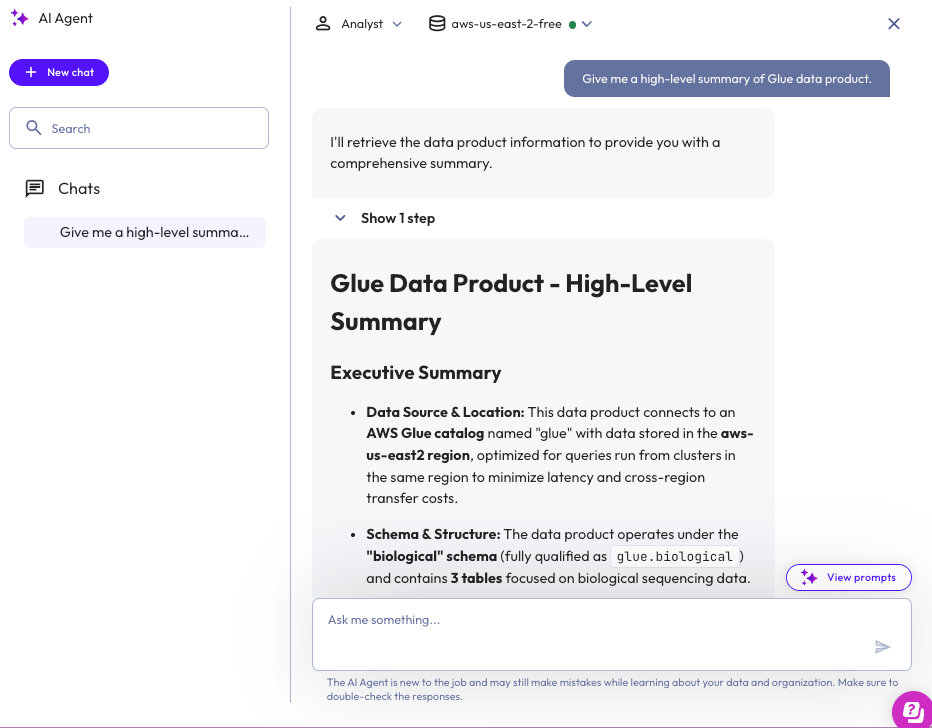
To open the chat dialog and begin a session with AI Agent:
- In the Galaxy navigation menu, click Data > Data products.
- Select an existing data product.
- Click
 AI Agent’s icon next to the Enrich with AI button.
 - In the chat interface:
- Use the left drop-down menu to select a persona.
- Use the right drop-down menu to select a cluster.
- Enter a question or prompt in the text area.
- Press Enter or click the send submit button.
Session history #
chat Chats are located on the left of the AI Agent chat dialog.
Use chat session history to review past AI Agent responses, including how different personas affected the answers. Session history shows the steps the AI Agent performed, including any tool calls and SQL queries executed during the conversation. Chat sessions are deleted after 90 days.
AI Agent sessions are tied to a particular user, not a role, such that only the user who initiated the AI Agent session can view their chat session history. The one exception is users who have been assigned a role with the Manage Security privilege. Any user with a role granted the Manage Security privilege can view all agent chat sessions initiated by any user.
Manage chats #
Each conversation appears in the chat Chats list.
-
To rename a chat, hover over it and click the more_vertoptions menu, then select Rename.
-
To delete a chat, hover over it and click more_vertoptions menu, then select delete.
-
Use the search search bar to find previous chats by name.
The following table describes the icons used in the AI Agent chat dialog:
| Icon | Description |
|---|---|
| content_copy | Copy the agent's response to clipboard. |
| download_2 | Download the agent's response. |
| send | Submit a question. |
| close | Minimize the AI Agent chat dialog. |
| more_vert | Open the options menu. |
| add | Start a new chat. |
| search | Search bar. |
| edit | Rename a chat. |
| delete | Delete a chat. |
Personas #
AI Agent supports three personas. Each persona tailors its responses to suit different user roles and goals. The following sections describe the Executive, Analyst, and Data Engineer personas.
Executive #
Provides high-level summaries tailored to executives and decision-makers.
- Focuses on business insights and trends.
- Omits technical detail unless explicitly requested.
- Presents concise bullet points for quick understanding.
Analyst #
Offers detailed analytical summaries suitable for analysts and data scientists.
- Includes statistical analysis and relationships in the data.
- Adds contextual information and potential implications.
- May include suggestions for further exploration.
Data engineer #
Provides technical summaries tailored to engineers.
- Focuses on structure, data quality, and metadata.
- Includes schema details, cardinality, and patterns.
- Highlights potential data issues or anomalies.
Is the information on this page helpful?
Yes
No