
Model Context Protocol (MCP) on Starburst Galaxy #
Starburst Galaxy hosted Model Context Protocol (MCP) functionality enables AI assistants and applications to connect to your Galaxy data infrastructure using the MCP standard. With the MCP server, you can allow AI tools to discover your clusters and catalogs, execute read-only SQL queries against your data through natural language interactions, and more.
MCP on Starburst Galaxy provides a secure, standardized way to integrate Galaxy with popular AI development tools like Claude Desktop, Cline, GitHub Copilot, and other MCP-compatible applications.
Use cases #
The Starburst Galaxy MCP server enables the following workflows:
- Data exploration: Allow AI assistants to help you discover and understand your data structures, schemas, and catalog organization.
- Query assistance: Enable AI tools to help you write, optimize, and execute SQL queries against your Galaxy data.
- Documentation generation: Use AI to automatically document data schemas, table structures, and catalog contents.
- Data analysis: Perform read-only analysis and reporting through natural language queries to AI assistants.
- Development workflows: Integrate Galaxy queries into your AI-powered development environment for rapid prototyping and testing.
Prerequisites #
Before you begin using the Starburst Galaxy MCP server, you must have:
- A Starburst Galaxy account in the Mission Critical, Enterprise, or free trial tier
- An MCP-compatible client application (such as Claude Desktop, Cline, or LibreChat)
- Your Galaxy account (for example,
mycompany.galaxy.starburst.io) - For OAuth authentication (recommended), one or more configured OAuth clients
Authentication #
The Starburst Galaxy MCP server supports two authentication methods:
Basic authentication #
Use your Galaxy username and password to authenticate. Basic authentication is suitable for testing and development purposes.
You can also use a service account’s credentials for programmatic access.
Submit credentials as an HTTP Basic authentication header base64 encoded. Use
the format <email>:<password> (before encoding).
Note that public API tokens are not supported for MCP authentication.
OAuth 2.0 authentication (recommended) #
Use OAuth 2.0 with an OAuth client for production deployments and shared environments. This method complies with the MCP Authorization standard and provides better security for access.
Galaxy supports MCP authorization protocol versions 2025-06-18 and above.
Requirements:
- A private or public OAuth client created in your Galaxy account.
- The OAuth client must have the
galaxy.mcpscope. - You must use an existing Galaxy OAuth client; OAuth Dynamic Client Registration (DCR) is not supported.
MANAGE_OAUTH_CLIENT privilege. See OAuth clients for detailed setup instructions.Configuration #
The following examples show how to configure the Starburst Galaxy MCP server in
popular MCP client applications. Replace <account-name> with your
Galaxy account name.
The MCP server URL format is:
https://<account-name>.mcp.galaxy.starburst.io
Claude Desktop #
Claude Desktop requires OAuth authentication. To set up the connection, follow these steps:
- Create an OAuth
client.
You can choose a public or private client depending on your organization’s
requirements. When you create the client, choose
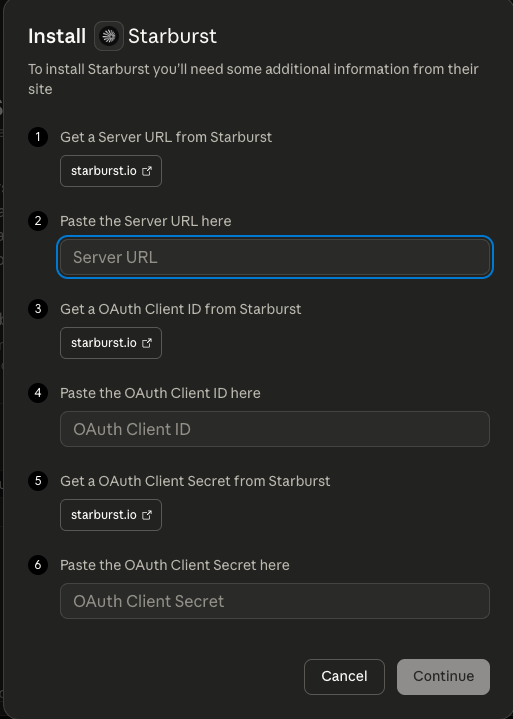
Customas the Application and include the following URI as a redirect URI:https://claude.ai/api/mcp/auth_callback. Save the client ID and (optionally) the client secret. - Open Claude Desktop and navigate to the Customize screen. Click the Connect your apps tab, then search for “Starburst” and connect.
- In the connection configuration, set the server URL to
https://<account-name>.mcp.galaxy.starburst.io. Enter the client ID and (optional) client secret. - Click Connect to establish the connection. You can now use Claude Desktop to query your Galaxy data through the MCP server.
Claude Code #
Claude Code lets you to connect using OAuth authentication or basic authentication. Follow the instructions below for your preferred method.
OAuth authentication #
To use OAuth authentication with Claude Code, create an OAuth client. The
client can be a public client (without a secret) or a private client (with a
secret). Include at least one redirect URI in the form
http://localhost:<port>/callback when you create the client. Note the port,
as you will need it for the next step.
Then, configure the connection in Claude Code using the following command, substituting the appropriate values for your OAuth client and Galaxy:
claude mcp add --transport http \                                                   141 ↵
  --client-id ${MY_OAUTH_CLIENT_ID} \
  --callback-port ${MY_PORT_FROM_ABOVE} \
  my-mcp-server ${ACCOUNT_MCP_URL}
Your account MCP URL will be in the format
https://<account-name>.mcp.galaxy.starburst.io.
Basic authentication #
To use basic authentication with Claude Code, you can configure static credentials to be used as a Basic auth header. Use the following command, substituting the appropriate values for your Galaxy account and credentials:
claude mcp add-json my-mcp-server '{"type":"http","url":"${ACCOUNT_MCP_URL}","headers":{"Authorization":"Basic ${CREDENTIALS}"}}'
Credentials must be a base64 encoded string in the format <email>:<password>.
Your account MCP URL will be in the format
https://<account-name>.mcp.galaxy.starburst.io.
Generic MCP client #
For any MCP-compatible client that supports custom server configuration, use the following format:
Server URL: https://<account-name>.mcp.galaxy.starburst.io
Basic authentication:
- Username: Your Galaxy email (may be a service account’s email)
- Password: Your Galaxy password
- Optionally, a custom header of
Authorization: Basic <base64_encoded_credentials>
OAuth 2.0 authentication:
- Client ID: Your OAuth client ID from Galaxy
- Client Secret: Your OAuth client secret from Galaxy
- Scope(s):
galaxy.mcp(the only accepted scope for MCP) - Authorization endpoint:
https://<account-name>.galaxy.starburst.io/oauth/v2/authorize - Token endpoint:
https://<account-name>.galaxy.starburst.io/oauth/v2/token
Refer to your MCP client’s documentation for specific configuration steps.
Limits and constraints #
The Starburst Galaxy MCP server has the following limits and constraints:
Query operations:
- Result sets are limited to 100KB.
- Only read-only SQL statements are supported (
SELECT,SHOW,EXPLAIN). - Write operations (
INSERT,UPDATE,DELETE,CREATE,DROP, etc.) are not permitted.
Authentication:
- OAuth Dynamic Client Registration (DCR) is not supported; you must use existing Galaxy OAuth clients.
- When setting up an OAuth connection, you must use the
galaxy.mcpscope.
Access control:
- Users can only access clusters, catalogs, and data permitted by their role’s privileges.
- Currently, setting a custom role is not supported. The default role assigned to the authenticated user is the role used for MCP operations.
Related documentation #
- OAuth clients - Configure OAuth authentication for the MCP server
- Clusters - Manage Galaxy compute clusters
- Catalogs - Configure and manage data catalogs
- Access control - Understand roles and privileges
- Model Context Protocol - Official MCP documentation
Is the information on this page helpful?
Yes
No